Velaptor Release v1.0.0-preview.48

Welcome to the biggest release in Velaptor's history! 🎉
This release marks the completion of the largest technical undertaking I have ever done: the migration of the entire rendering backend from OpenGL to WebGPU. The rendering stack has been rebuilt from the ground up with modern WGSL shaders, render pipelines, and buffer management—and the old OpenGL machinery is completely gone.
This release consisted of the following:
- ~4 months of work with a single developer (me).
- 440 files changed.
- 25,940 lines of code added.
- 26,139 lines of code deleted.
Needless to say, it has been a huge undertaking that I have been thinking about for at least 3 or so years.
Because of the scope of this change, this release ships with several breaking changes. If you have an existing Velaptor project, please read the breaking changes section carefully before upgrading.
It's a long one!
Check out the Velaptor Release Notes
Quick Overview
The headline of this release is the WebGPU rendering backend. Every texture, font, shape, and line is now drawn through modern WebGPU native pipelines instead of legacy OpenGL. Alongside that, I shipped a brand new 2-D camera system, a built-in FPS counter with much more accurate frame metrics, reference-counted font unloading, and roughly 18 bug fixes. This one is a big deal, so let's dig in.
Why did we switch render backends?
Assuming you mean native WebGPU via implementations like wgpu (Rust) or Dawn (C++), here are the top 10 reasons to choose it over OpenGL:
-
Explicit pipelines and no global state
WebGPU uses prebuilt pipeline state objects and render pass descriptors. There’s no hidden “current state” that affects later draws like in OpenGL, so behavior is predictable, easier to debug, and less prone to state leakage bugs. -
Much lower CPU overhead
Pipelines, bind groups, and command buffers are created once and reused. The driver does far less per‑draw validation and state tracking than OpenGL, which often re‑validates and re‑compiles behind the scenes. -
True multithreaded command recording
You can record command buffers on multiple threads simultaneously and submit them to a single queue. OpenGL contexts are effectively single‑threaded; sharing them across threads is fragile and often unsupported. -
First‑class compute shaders
Compute is core to WebGPU: storage buffers, workgroup memory, and dispatches are built in and work everywhere. OpenGL compute requires 4.3+ (not available on macOS, which is stuck at 4.1) and has inconsistent driver support. -
Explicit memory and synchronization control
You specify buffer/texture usage and map memory explicitly. This avoids the driver secretly moving resources, stalling, or using unpredictable VRAM — a common source of OpenGL hitches. -
Cross‑platform consistency
Native WebGPU runs on Vulkan, Metal, D3D12, and has an OpenGL fallback. The same API works across Windows, Linux, macOS, Android, and iOS. OpenGL behavior varies widely by vendor, and on macOS it’s deprecated and frozen. -
Access to modern GPU features
Storage buffers, texture views, timestamp queries, depth‑clip control, and optional extensions (e.g., ray tracing, bindless) are exposed through a consistent API. OpenGL relies on a sprawling set of vendor‑specific extensions. -
Robust validation and error reporting
WebGPU validation layers give clear, structured error messages and are designed to prevent undefined behavior. OpenGL misuse often leads to silent corruption, driver‑specific glitches, or hard crashes. -
Active development and future‑proofing
wgpu and Dawn are under active development, adding features, improving performance, and supporting new GPUs. OpenGL is in maintenance mode — no new core features are coming. -
Modern language bindings and safer resource management
wgpu offers a safe, idiomatic Rust API that enforces ownership and prevents misuse at compile time. Dawn provides a clean C++ object‑oriented API. OpenGL’s C API relies on manual resource management and global state, which is error‑prone. -
If you ever need to target the web, native WebGPU code ports to WebAssembly/browser almost unchanged — something OpenGL cannot do.
- This one really opens the door. This means we have a path to run Velaptor games in the browser!
Goodbye OpenGL, Hello WebGPU
The entire rendering backend has been rewritten. All of the OpenGL code—GLInvoker, OpenGLService, GLSL shaders, and the
VAO/VBO/EBO GPU buffer types—has been deleted and replaced with a WebGPU implementation built on WGSL shaders, render
pipelines, bind groups, and vertex/index buffers.
Diagram showing the Velaptor rendering stack before and after the WebGPU migration: the game and public API above are unchanged, while the OpenGL stack below was replaced with the WebGPU stack.
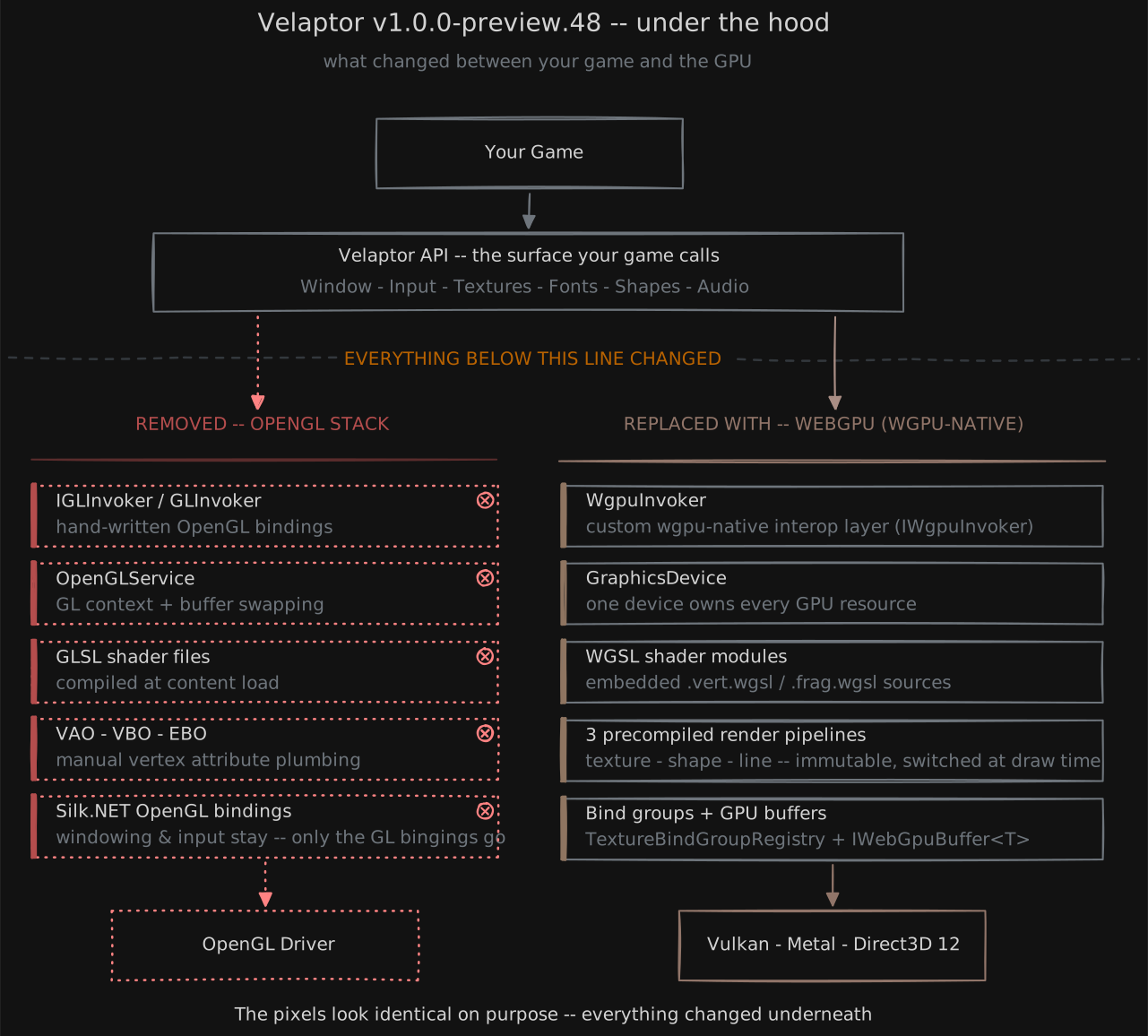
What does this mean for you? Your drawing code (IBatcher, renderers, IContentManager) keeps the same shape, but the
rendering underneath is completely new. This does mean Velaptor now requires WebGPU's native libraries (wgpu-native)—but
more on that below; all of that is handled for you automatically.
WebGPU gives us a modern, cross-platform graphics API with far less driver overhead, a much cleaner resource ownership model, and a foundation I can build on for years to come. It's been thoroughly tested with manual testing by physically, and manually testing out each Velaptor feature on full Windows, Linux, and macOS machines. No testing was performed on VMs.
Breaking Changes
With a change this large, some API churn is unavoidable. Velaptor is still in preview so this is to be expected. I have kept the breaking list as tight as possible, and each item below includes what changed and what you need to do.
If you hit any snags while upgrading, please let me know in the release discussion.
1: Scenes No Longer Implement IDisposable
IDisposable was removed from the IScene interface, and the Dispose() / Dispose(bool) methods along with the
isDisposed property were removed from SceneBase.
What to do: Remove any Dispose() overrides from your custom scenes. Scene cleanup is now handled automatically by the
framework when a scene is unloaded—you no longer need to (or can) manually dispose a scene.
2: Line Rendering Merged Into Shape Rendering
The ILineRenderer interface and LineRenderer class were deleted. All line-drawing methods now live on
IShapeRenderer / ShapeRenderer.
What to do: Use the shape renderer to draw lines instead of a separate line renderer.
3: Font Renderer Renamed to Text Renderer
You're not rendering fonts—you're rendering text using a font. The old name was semantically wrong, and I wanted to fix it before v1.0.
IFontRendererhas been renamed toITextRenderer.FontRendererhas been renamed toTextRenderer.RendererFactory.CreateFontRenderer()has been renamed toRendererFactory.CreateTextRenderer().
What to do: Rename your IFontRenderer usages to ITextRenderer, and switch any
CreateFontRenderer() factory calls to CreateTextRenderer().
4: Glyph-Metrics Render Overload Removed
The IFontRenderer.Render(...) overload that accepted a Span<(GlyphMetrics metrics, Color clr)> glyph array was removed.
What to do: Use the remaining string-based Render(IFont font, string text, ...) overloads instead.
5: ShowAsync() Removed From Game Window
The ShowAsync(Action? afterStart, Action? afterUnload) method was removed, and IWindow no longer references
System.Threading.Tasks.
What to do: Windows are now shown synchronously—replace ShowAsync(...) calls with Show().
6: Dispose() Removed From Game Window
IWindow no longer inherits IDisposable, and the Dispose() method was removed from Window and the internal window
implementation.
What to do: You no longer dispose the window yourself. Calling Close() is enough—closing the window now triggers the
full cleanup and shutdown process internally.
7: AutoClearBuffer Removed From Game Window
The AutoClearBuffer property was removed.
What to do: Nothing—the back buffer is now always cleared automatically by the renderer, so the old "should I clear the buffer automatically?" toggle is gone.
8: Avalonia Integration Removed
The Testing/AvaloniaTesting sample application and the internal AvaloniaRenderContext class were deleted. This was
an experimental feature that had to do with another personal project named Plazma Studio.
Why: The Avalonia sample showed how to embed a Velaptor render surface inside an Avalonia UI control, but it depended on the old OpenGL backend and cannot work with WebGPU.
This is an ongoing project that I have been working on to help bring easy and automated particle systems to game development. This app used the the Avalonia rendering control to allow Velaptor to perform the rendering. This will need to be revisited in the future due to the rendering backend being changed.
New Features
2-D Camera System
A brand new ICamera2D interface (with the Camera2D implementation) gives you pan and zoom for your 2-D scenes. It works
in screen-pixel coordinates with a top-left origin, exposes Position (pan) and Zoom (with ZoomMin / ZoomMax limits),
Rotation, and includes TransformPosition(...), TransformSize(...), and TransformRotation(...) helpers to convert world coordinates into screen positions.
This shows zooming in and out using the camera system.
Built-In FPS Counter
The Window now renders its own FPS counter in the bottom-left corner, and you can pick the text color with the new
FpsDisplayColor property (a System.Drawing.Color, defaulting to white). The counter is toggled with the keyboard
shortcut Ctrl + Alt + Shift + S.
Smarter FPS Metrics
FPS is now computed by a new FrameMetricsTracker that uses a ring buffer of frame times instead of the old simple
calculation. The reported Window.Fps value is smoother and more accurate, and the tracker also computes advanced metrics
like average FPS, 1% low FPS, and 0.1% low FPS—great for spotting stutters that an average calculation alone would hide.
Batch Size Statistics
The batching manager now exposes TotalBatchSizeKb, the total size of batch item data sent to the GPU—texture, font,
shape, and line data combined. This has not been exposed to the public API yet, but lays the groundwork for surfacing memory-usage
statistics to game developers in a future release.
Reference-Counted Font Unloading
Fonts and their texture atlases are now reference-counted internally. When you unload a font, the framework checks whether anything else is still using it—fonts and atlases are only actually unloaded and disposed once nothing references them anymore. This prevents premature disposal and improves memory reuse.
New TextRenderer Overload
A handy new render overload for rendering text lets you pass a Vector2 position, render size, angle, and color in a single call:
Render(IFont font, string text, Vector2 position, float renderSize, float angle, Color color, int layer = 0)
Transitive Native Library Distribution
A new build-targets file (KinsonDigital.Velaptor.targets) is now distributed to projects that consume Velaptor. When you
reference Velaptor, the native libraries (like wgpu-native) are automatically copied next to your running application on
all operating systems. No more worries about wrangling native binaries.
Bug Fixes
This release squashes a lot of bugs—many of them side effects of the backend migration, caught by exhaustive manual testing on all three platforms. Here's the full list:
| Fix | Description |
|---|---|
| Window crash on close (Linux) | Closing the window on Linux no longer crashes. |
| Crash when minimizing the window | Minimizing the window no longer causes a crash. |
| Crash when switching scenes | Switching between scenes no longer crashes due to improper disposal. |
| Text rendering glitch when switching scenes | Text now renders correctly after switching scenes. |
| Premature disposal of shared UI reactable | Shared UI messaging was being disposed too early; fixed so UI keeps working. |
| Multiple batches not rendering | Rendering more than one batch per frame now draws all batches correctly. |
| Buffer handles disposed between render layers | GPU buffer handles are no longer disposed between rendering layers. |
| Shape rendering issue on macOS | Shapes now render correctly on macOS. |
| Batch resizing across render layers | Fixed resizing batches across layers when dispatching renders. |
| GC pressure in font rendering | Fixed a major allocation issue that was causing garbage-collection pressure. |
| Shutdown cleanup skipped by exceptions | The user Uninitialize callback is now exception-guarded, and GPU resource cleanup is driven by the window's closing handler, so shutdown cleanup always runs. |
| Events not logged to file when logs dir missing | Log files are now written even if the logs directory didn't exist yet. |
| Texture/font/atlas/audio unloading handled incorrectly | Unloading of each content type now works correctly under all conditions. |
| Apps with no scenes failing to render | An app with no scenes now runs instead of failing to render. |
| Animated graphics scene issue | The animated graphics test scene now works correctly. |
| Batching and rendering stats | Fixed incorrect batching/rendering statistics. |
| mp3 audio content name with no extension | Loading mp3 content by name without the file extension now works. |
| Monitor scaling ignored | Rendering now takes monitor scaling into account on HiDPI displays, where the framebuffer can be 2× the logical window size. |
One more crash worth calling out on its own: disposing of atlas data that had already been unloaded would crash the
application. This happened because the AtlasData.Texture property wasn't nullable—when two components shared the same
cached atlas data and one disposed of it, the other was left holding a dead reference. The AtlasData.Texture property is
now nullable, and Unload() properly checks for a null texture before doing anything else. If you've ever had two game
objects share an atlas and unload out of order, this one's for you.
Performance Improvements
All performance tests were done with:
- CPU: ROG Zephyrus G16 with an Intel Core Ultra 9 185H with 22 cores.
- GPU: NVIDIA GeForce RTX 4070
| Benchmark | Before | After | Improvement |
|---|---|---|---|
| Coordinate Renders (500,000 items) | 928.9 ms | 887.8 ms | ~4.6% faster |
Render dispatch is measurably faster—the benchmark above allocates the same 416 bytes, so all of that gain comes from the dispatch path itself. On top of that, a major per-frame allocation in the font renderer was eliminated, which significantly reduces garbage-collection pressure during text-heavy scenes. The initial batch capacity was also reduced from 1,000 items down to 100, so memory isn't allocated up front for batch space you may never use.
Housekeeping
A few last things worth mentioning:
- Internal window renamed:
GLWindowis nowWgpuWindow, reflecting the new backend. It now owns the full shutdown/disposal flow from the window's closing handler. - Namespace restructuring: rendering types moved from
Velaptor.OpenGL.*/Velaptor.Graphics.*toVelaptor.WebGpu.*, with batch-item types and the batcher implementation living underVelaptor.WebGpu.Batching. - Cleanup: the
csharp-webgpulearning prototype and the temporary WebGPU testing scene have been removed—now that the real implementation exists, they've served their purpose. - New logo: the application icon was updated to the current Velaptor logo.
- Dependency updates: CASL and shared dependencies were updated, and code-analysis packages were added to the projects.
What's Next?
Looking ahead, the next release will include two big additions: controller support and an upgrade to .NET 10. If you have thoughts on either—or anything else you'd like to see in Velaptor—drop them in the release discussion linked below.
Get Started & Get Involved
Ready to take the new WebGPU backend for a spin? Here's everything you need:
- Install the package: run
dotnet add package KinsonDigital.Velaptor --prerelease, or grab it directly from NuGet. - Read the docs: the documentation has everything you need to get up and running.
- Explore the samples: the sample projects all run on the new WebGPU backend—clone one and see it in action.
- Questions or upgrade pain? Join the v1.0.0-preview.48 release discussion. Found a bug? Please open an issue.
That's all for this one! Until the next release! 🚀